Showing posts with label Ancestry Pro Tools. Show all posts

Friday, January 12, 2024

My Ancestry Pro Tools Experience

I have tried out Ancestry's add-on subscription Pro Tools and have written blog posts about my experience using the different tools available through that subscription.  You can find those posts linked below.

Ancestry's Pro Tools Suite
As I have finished out my test drive and decided that the tools were not something I would want to keep from month to month on my account, it was time to cancel that portion of my Ancestry subscription.  In order to cancel it, I did as I always do when I cancel my regular subscription from time to time.  
  • Click on my picture in the top right
  • Select Account Settings
  • Scroll Down to Membership
The Ancestry Pro Tools Membership was listed below my active US Discovery Membership so I scrolled further down and selected the "Cancel membership" option beneath the Ancestry Pro Tools Membership.  When I unsubscribe from services I always expect them to try and convince me to keep my subscription but this one was rather confusing and may have been due in part to them really not offering an add-on subscription before, and not having things set up for an unsubscription from it.  They should have had that ready before release as the screen that is presented after canceling the Pro Tools was confusing.


The above screen made me wonder if my hints were going away but not wanting the extra charge I continued on with my cancellation.

They asked for an explanation of why I wanted to cancel and while there were several that applied, I chose too expensive.

I guess they wanted a more detailed explanation for anyone who chose the expense as a reason for cancelling. They might have had something similar on the other choices I don't know.  This was the one I thought was most applicable to my situation.

I selected it and clicked on Cancel membership. On the Cancellation Details screen I was assured that "No other subscriptions on your account will be affected by this cancellation."   Sigh....why not say that in the first place.  It just really feels like bad business practice to me when companies make it hard for folks to unsubscribe or in this case make you uncertain of what is available after cancellation.  Hopefully they will improve on this.  

I am thankful that the cancelation can be done without having to make a phone call.  In the earlier years, that was not the case and I didn't subscribe because I dreaded the unsubscribing process.  😀


Will I subscribe to Pro Tools again?   I don't know--maybe once a year if I get extra time to tinker and they offer some DNA tools that weren't already available.  

Monday, January 01, 2024

Trying Ancestry's Pro Tools Suite: Advanced Filters

In my previous posts which focused on Ancestry's Pro Tools Suite I did a "test drive" of the following Pro Tools:  Tree Checker, Charts and Reports, and Map View.  The Advanced Filters feature is also part of the Pro Tools subscription. 


Where will you find those filters?  That's a great question. From what I could tell, the majority of Advanced Filters are really part of the functionality of Tree checker and Map View 

Adv Filters in Tree Checker


Adv Filters via Tree View Menu of Map View


The other part of the Advanced Filters tool comes into play when you do a search.  A subscriber to the Pro Tools add-on is given the option to filter the results so that they see unviewed results only.


Prior to subscribing to Pro Tools I could see search results noted as  "In Your Hints", "Seen Today", "Ignored Hint",  etc.  I can still see these when I haven't selected the Unviewed Results option.  I don't know if those notations will still be available when I'm not subscribed to the Pro Tools add-on or not.  In my opinion it just seems a bit much to consider the Advanced Filters as a separate tool.  

I and other subscribers to the Add-on have had issues with it not updating error lists in a timely manner as well as not recognizing that we are subscribed to it without refreshing a number of times.  It's a new tool and I would expect to deal with these issues if I were beta testing, or it were free. I do not have a lot of patience for things like this when it comes to something that I will be paying close to $120(at the monthly rate of $9.99) if I were to remain subscribed to it for the entire year. Folks who are on a fixed income in today's economy will likely not either. 

Sunday, December 24, 2023

Trying Ancestry's Pro Tools Suite: Map View

I'm continuing my test drive of Ancestry's Pro Tools Suite.  This post is focusing on the Map View tool.  You can find this tool in a number of places: in the Tree menu, or from the LifeStory tab of a Profile page .  I believe if you are not subscribed to the add-on you will still see the option but with a locked icon to the right of it.  As of this writing the Maps feature is still showing as in BETA testing.  

Map View from Tree View Menu


If you have the add-on subscription to the Tools clicking on map will bring up the map for the current tree.  From what I have noticed, the Direct Line Ancestors and Any Events seem to be on by default when you open the Map tool each time.  I wish the filters would hold until cleared in this tool which is something I also think would help the filters in the other tools as well.  You may notice that there are issues with non standardized place names especially if you see any locations marked that are not locations where anyone in your tree has ever had a life event.  I saw several of these in mine.  Some where because I had failed to put a country name and the software was trying to figure out what I meant.  Also, some of the military files just had USA and created a cluster of those in the middle of the US.


Using filters, I modified the map to show anyone in my tree with any events from 1700-1775 so I could see anyone who was in the US before the Revolutionary War.  I do not have any direct ancestors who arrived after 1775.


Filter For Map Tool
Name:
Location:
Time (range or exact year)

Events:
    Birth
    Marriage
    Death
    Burial
    Lived In
    Any Event

Family Line:
    Direct Line Ancestors
    Paternal Line
    Maternal Line

Direct Line is selected by Default. You can turn off Direct Line and focus further by specifying Paternal or Maternal Ancestors . It will show both sides if you do not specifically select one of them.

You can also choose filtering by MyTreeTags™ and can use your custom tags as well as the standard ones offered by Ancestry.

To find the map tool from a profile you will need to look under the LifeStory tab of  your person of interest.


Once you select the LifeStory tab and click on the map you can zoom in and see events on the map. You can toggle the Location content(preview) off on the map by selecting the Location Content tab and unchecking that option. That way you only see the location events in the side panel and not on both the panel and the map.  The circle of events at a specific location can be expanded as shown in the screenshot below which also has the Location Content enabled.


I wondered if this too would be changing the View DNA matches by location map, but didn't see any obvious change there.  I also checked from the Match pages for the Ancestor Birth Locations and found nothing to imply that there would be a change there either.


The map view was the tool that I had been looking forward to using the most.  While it does have some cool features I am somewhat  disappointed with the zoom feature and it was more than a bit hard to tell how to find the filters once you had clicked on a zoomed in location.  It's still in BETA so it's not overly user friendly.  I'm sure there will be changes which will hopefully improve how this works. 

I don't feel like it is something I HAVE to have.  It would be a nice addition to what they currently offer but only in bringing it more up to what it should have had in the first place.  That's purely my opinion and it may be more valuable to others who don't have access to software outside of the site that will do the same thing and more.  

Thursday, December 21, 2023

Trying Ancestry's Pro Tools Suite: Charts and Reports

I'm continuing my test drive of Ancestry's Pro Tools Suite.  This post is focusing on the Charts and Reports tool.  You can find this tool in a number of places:  in the Tree menu, on a Profile page and from the view menu while viewing a tree.  I believe if you are not subscribed to the add-on you will still see the option but with a locked icon to the right of it.

From Tree Menu
  
From Family Tree Chart View

From a Profile

I believe I may have included some of the Insights or Filters in my blog post about the Tree Checker .  If you missed it you might want to check that out.  

Reports
The Reports Tool looks something like this.


Customization of Report
  • Document Type: Descendancy, Ahnentafel, Register, or Family Group Sheet
  • Document Style: Pine or Birch(I guess in sticking with the tree theme)
  • Total of Generations: 2-7
  • Focus Person (select/change)
  • Output: Download or Print

I selected Print and then Print to PDF out of habit rather than downloading the report. Selecting download would accomplish the same thing.


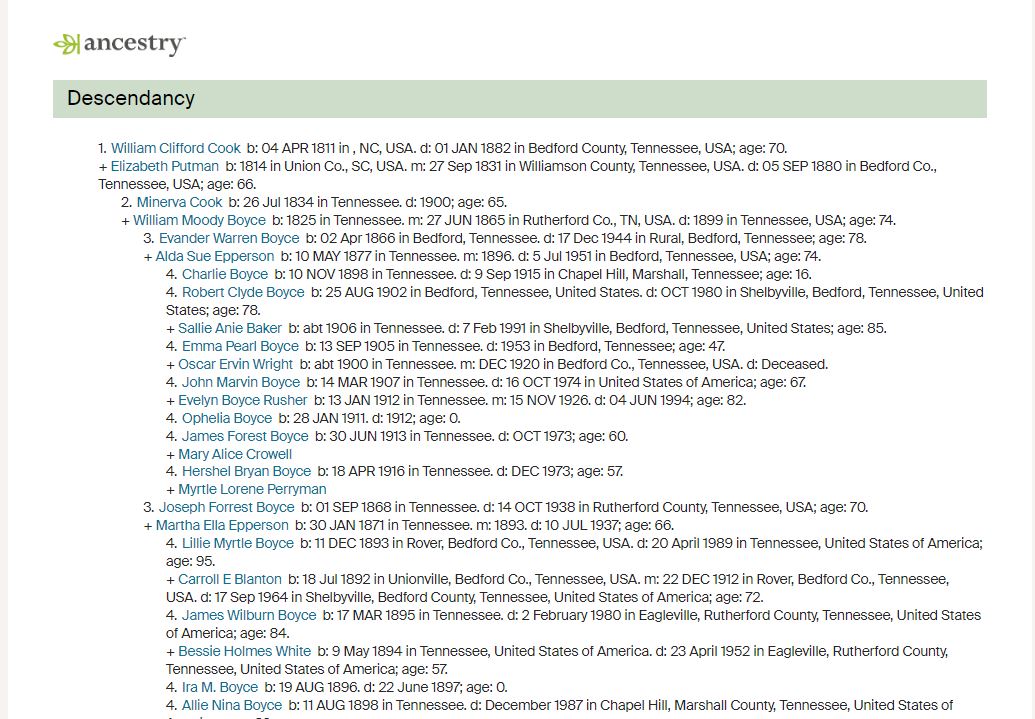
4 Generation Descendancy Report of Wm Clifford Cook
Using the Pine Style

I was not overly impressed with the Reports part of Pro tools.  I can see how it might have value for someone who doesn't use desktop tree software.  However, FamilyTreeMaker, RootsMagic, Legacy and most other tree building programs all have  a charts and reports option.  I would love to see sources added to the reports and also a stand alone source report or listing.

Charts
I am including a bit about the fan chart features which are for the most part new and are likely what they are referring to as Charts. Ancestry lowered the mount of generations we could include in a fan chart  to 5 generations unless you have the Pro Tools add-on.  If you have the add-on then you can view 7 generations and some cool features.  There is a heatmap view of Hints, Photos, and Sources which is pretty cool but not something I'd consider purchasing an add-on to use.

Fan Tree Views


Sources Heatmap View

Of course more is not always better in terms of sources.  The quality of the sources mean so much more.  For all you know, my sources could all be  Ancestry Trees.  Thankfully that is not the case.

Wednesday, December 20, 2023

Trying Ancestry's Pro Tools Suite: Tree Checker


Ancestry recently introduced their new Pro Tools which is an add-on subscription. As a current subscriber to Ancestry with a US Discovery Membership, I was given the option to add the tools which I did for a monthly fee of $9.99. My plan is to cancel the Pro Tool add-on before next month's charge.  This will allow me to test drive the tools and see if they are an option for which I can justify spending money. 


I have a good number of trees with my main tree containing 18000+ people.  It took it awhile to index my main tree.  

Tree Checker--I am all for anything that allows us to make corrections more easily.  Possible Errors had only two tabs on mine:  Possible Duplicates, and Other Possible Issues.  You can further filter the list by clicking on More Filters 

Family Line
    Direct Line
    Paternal Line
    Maternal Line
    End of Line
Events & Places
    Birth 
    Marriage 
    Death 
    Lived In
    Any Event
Possible Errors
    Possible Duplicates
    Other Possible Issues
Hints
    Has Hints

I noticed that once I corrected or merged I was given the option to View All Errors.  This was not helpful.  It had opened the selected issue up in a new tab(I'm on Chrome.) An option to close this window and refresh the previous screen would have been more helpful for the process. 

Beyond the duplicates, the error that I noticed the most in my tree was caused when I'd added the 1940 census.  Some of the children who were under 5 in 1940 had gotten a residence fact associated with their profile.  I believe this was corrected at a certain point and it's no longer necessary to remember to uncheck that box when adding those under 5 from the census record.  It would be nice if there was a way to work on specific errors other than have them all lumped in the "other possible issues" category.

It discovered a "floater" in my tree and displaced this error when I clicked on the  "!"


Sometimes my floaters are intentional--other times they are from me sloppily deleting a parent, spouse or child of that person and losing them within the database.

We can expect to see changes in how the tool works these next few weeks errors and bugs in how it works are reported and modified.  It is hard to get a workflow going for the error connection process. I don't feel that the Tree Checker should be part of a paid tool suite, mainly because of the value it brings to Ancestry's tree database when people use it and make corrections. It should be available to anyone who is building trees at Ancestry because the accuracy of those trees help to improve the Hints, Thrulines and Suggested Records etc.


The Tree Checker is just one of the tools in the Pro Tools suite.  I will be trying out some of the others in the next few days and share my thoughts on those.  I am excited about the Map Views but that's a topic for another day.